
Introduction: The Rise of Headless Commerce with Shopify
Modern eCommerce demands speed, flexibility, and exceptional user experiences. Traditional monolithic storefronts often struggle to keep up with these expectations. This is where Shopify headless commerce comes in—and Shopify Hydrogen is Shopify’s official solution for building fast, custom storefronts.
“Headless commerce isn’t the future—it’s the competitive advantage modern brands need today.”
In this guide, we’ll walk through how to build a headless storefront using Shopify Hydrogen, covering architecture, setup, APIs, and best practices.
What Is Shopify Hydrogen?
Shopify Hydrogen is a React-based framework built specifically for headless Shopify storefronts. It leverages modern technologies like React Server Components, Vite, and GraphQL to deliver blazing-fast experiences.
Key Benefits of Shopify Hydrogen
- Optimized for Shopify Storefront API
- Server-side rendering (SSR) for performance
- Built-in components for carts, products, and collections
- Seamless integration with Shopify Oxygen (hosting)
Headless Architecture Overview
In a Shopify headless commerce setup:
- Backend: Shopify Admin + Storefront API
- Frontend: Custom Hydrogen (React) application
- Hosting: Shopify Oxygen or third-party platforms
- Communication: GraphQL APIs
This separation allows developers to fully control UX without being constrained by Shopify themes.
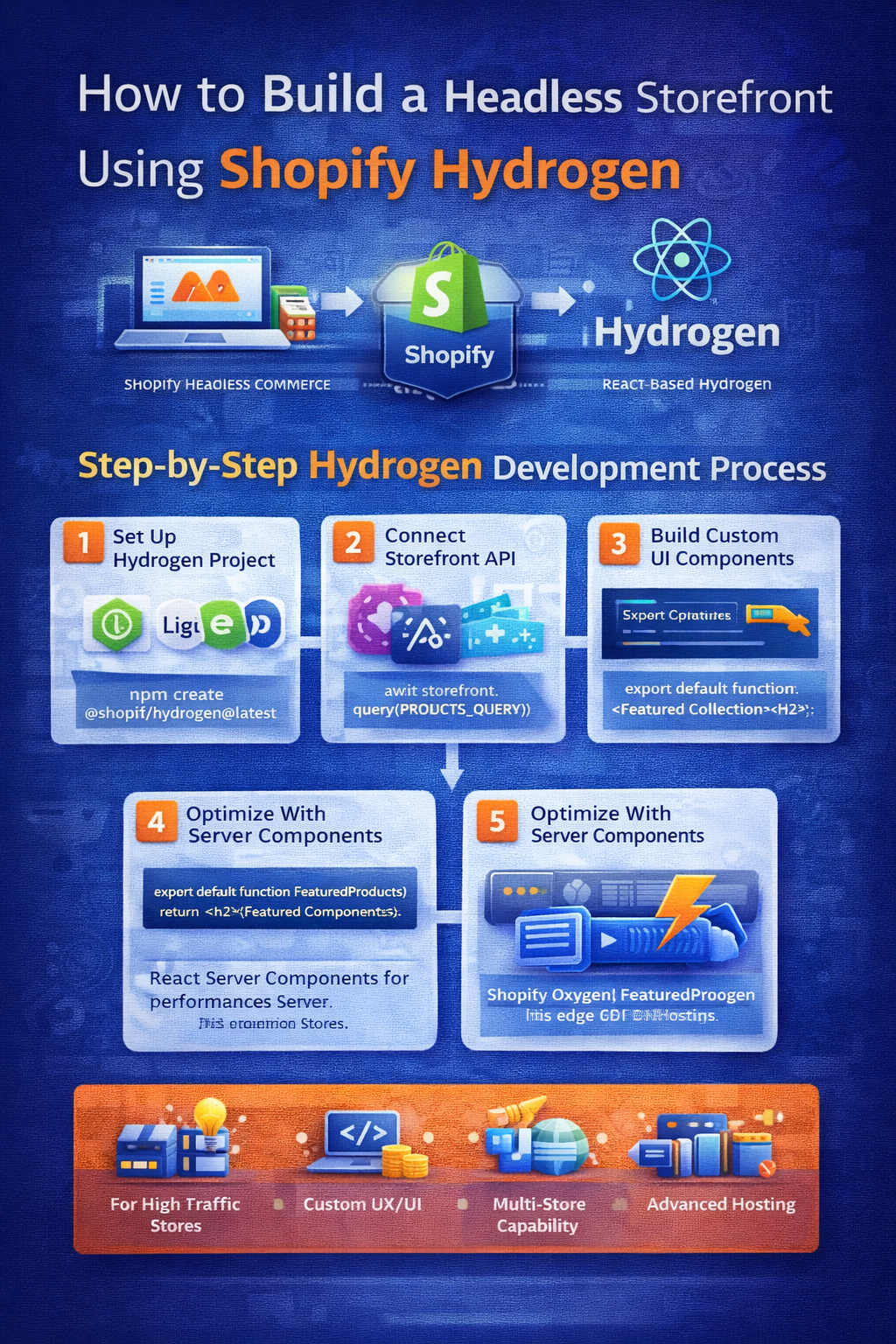
Step 1: Set Up a Shopify Hydrogen Project
Prerequisites
- Node.js (v18+ recommended)
- Shopify Partner account
- Existing Shopify store
Create a Hydrogen App
npm create @shopify/hydrogen@latest
cd hydrogen-app
npm run dev
This scaffolds a fully functional Hydrogen storefront with best practices baked in.
Step 2: Connect to Shopify Storefront API
Hydrogen uses the Shopify Storefront GraphQL API to fetch data securely.
Key configuration files:
.env(Storefront API token)shopify.server.ts
Example API usage:
const { products } = await storefront.query(PRODUCTS_QUERY);
This enables real-time product, pricing, and inventory data.
Step 3: Build Custom Pages & Components
Hydrogen provides pre-built components such as:
<Product /><Cart /><Money /><Image />
You can also create fully custom components using React:
export default function FeaturedProducts() {
  return <h2>Featured Collection</h2>;
}
This flexibility is a major advantage over traditional Shopify themes.
Step 4: Optimize Performance with Server Components
Hydrogen uses React Server Components (RSC) to:
- Reduce JavaScript sent to the browser
- Improve Time to First Byte (TTFB)
- Enhance Lighthouse performance scores
“Hydrogen shifts performance optimization from hacks to architecture.”
This makes it ideal for high-traffic and enterprise storefronts.
Step 5: Deploy with Shopify Oxygen
Shopify Oxygen is Shopify’s edge hosting platform built for Hydrogen.
Benefits include:
- Global CDN
- Automatic scaling
- Zero DevOps overhead
Deploy directly using:
npm run build
npm run deploy
When to Use Shopify Hydrogen
Shopify Hydrogen is best for:
- High-traffic stores
- Brands needing custom UX/UI
- Multi-region or multi-brand storefronts
- Performance-critical eCommerce sites
If you need deep frontend customization and scalability, Hydrogen is the right choice.
Conclusion
Building a headless storefront using Shopify Hydrogen unlocks unmatched performance, flexibility, and developer control. While it requires more technical expertise than standard themes, the payoff is a future-ready storefront built for scale.
“Shopify Hydrogen empowers developers to build experiences—not just stores.”