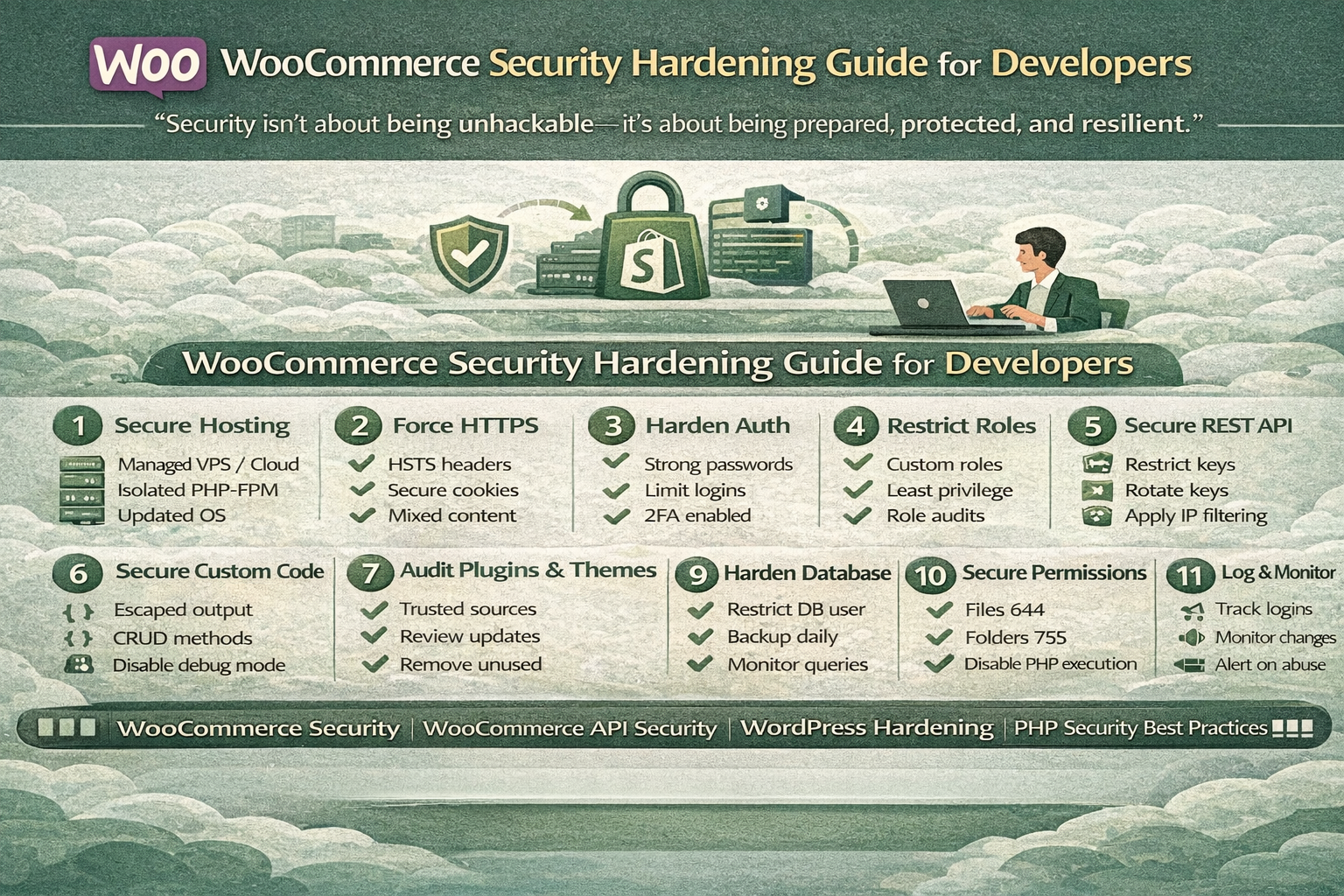

WooCommerce is powerful, flexible, and deeply customizable — but that same flexibility can expose security risks if not hardened correctly. While WordPress and WooCommerce provide a secure foundation, developer-level security decisions ultimately determine how safe a store truly is.
This guide covers WooCommerce security best practices from a technical and architectural perspective — focusing on prevention, isolation, validation, and monitoring.
“Security isn’t added after development — it’s built into every decision.”
Why WooCommerce Security Hardening Is Critical
WooCommerce stores handle:
- Customer personal data
- Payment flows
- Authentication sessions
- API integrations
- Admin-level access
Common attack vectors include:
- Plugin vulnerabilities
- Privilege escalation
- SQL injection
- XSS attacks
- REST API abuse
- Brute-force login attempts
For developers, security hardening is not optional — it’s required for scalable ecommerce systems.
1. Secure Hosting & Server Environment
Security starts at the infrastructure level.
Server Hardening Checklist
- Use managed VPS or cloud hosting
- Disable unnecessary services
- Enforce firewall rules (UFW / CSF)
- Enable automatic OS security updates
- Use isolated PHP-FPM pools
- Restrict file permissions (644 / 755)
Never host WooCommerce on shared servers for production-scale stores.
“An insecure server makes secure code irrelevant.”
2. Enforce HTTPS & Transport Security
SSL is mandatory — not optional.
Best Practices
- Force HTTPS sitewide
- Redirect HTTP → HTTPS
- Enable HSTS headers
- Secure cookies (
Secure,HttpOnly) - Disable mixed content
Transport-level encryption protects sessions, credentials, and checkout data.
3. Harden WordPress Authentication
Authentication is the most targeted area.
Recommended Measures
- Enforce strong passwords
- Enable 2FA for admin users
- Limit login attempts
- Disable XML-RPC if unused
- Restrict wp-admin by IP where possible
Use role-based access — never give administrators unnecessarily.
4. WooCommerce Role & Capability Control
WooCommerce extends WordPress roles with ecommerce capabilities.
Developer Best Practices
- Never use
administratorfor integrations - Create custom roles for staff
- Validate user permissions explicitly
- Avoid capability checks via user ID
Example:
if ( current_user_can('manage_woocommerce') ) {
    // safe execution
}
“Authorization failures cause more breaches than authentication failures.”
5. Secure WooCommerce REST API
The REST API is a powerful attack surface.
Security Best Practices
- Use OAuth or application passwords
- Restrict API keys by permission
- Rotate API credentials periodically
- Disable unused endpoints
- Apply IP whitelisting for integrations
Never expose admin-level API keys publicly.
6. Validate & Sanitize All Input
User input is never trusted — even from admins.
Always:
- Sanitize before saving
- Escape before output
- Validate data type
- Never trust
$_POSTor$_GET
Example:
$value = sanitize_text_field($_POST['custom_field']);
This prevents:
- XSS
- SQL injection
- Stored malicious scripts
“Every input is hostile until proven safe.”
7. Secure Custom WooCommerce Code
Custom snippets and plugins are common vulnerability points.
Developer Rules
- Never echo unsanitized data
- Avoid direct database queries
- Use WooCommerce CRUD methods
- Avoid eval or dynamic execution
- Namespace custom plugins
- Disable debug mode on production
Use:
define('WP_DEBUG', false);
in production environments.
8. Plugin & Theme Security Management
Third-party code is the biggest risk factor.
Best Practices
- Install plugins from trusted authors only
- Remove unused plugins immediately
- Avoid nulled or pirated themes
- Review plugin update history
- Monitor vulnerability disclosures
“Every plugin increases your attack surface.”
9. Database Security & Protection
WooCommerce heavily relies on postmeta tables.
Hardening Techniques
- Restrict database user permissions
- Disable remote database access
- Use strong credentials
- Enable daily backups
- Monitor unusual query spikes
Never allow database users full privileges unless required.
10. File Integrity & Permissions
Incorrect permissions allow malicious injections.
Recommended Permissions
| File Type | Permission |
|---|---|
| Files | 644 |
| Directories | 755 |
| wp-config.php | 600 |
Disable PHP execution in upload directories.
11. Logging, Monitoring & Alerts
Detection is as important as prevention.
Monitor:
- Login attempts
- Admin role changes
- Plugin installs
- File changes
- REST API abuse
Use security logs and alerts to respond early.
“Security failures aren’t silent — monitoring makes them visible.”
12. Backup & Incident Recovery
No security system is perfect.
Backup Strategy
- Daily automated backups
- Off-site storage
- Versioned backups
- Test restore procedures
Recovery readiness is part of security hardening.
Developer Security Checklist
✔ HTTPS enforced
✔ Server hardened
✔ Admin access restricted
✔ API keys secured
✔ Input sanitized
✔ Plugins audited
✔ File permissions locked
✔ Backups configured
Conclusion
WooCommerce security hardening is not about installing one plugin — it’s about layered defense across infrastructure, code, access, and monitoring.
For developers, following WooCommerce security best practices ensures stable, compliant, and trustworthy ecommerce platforms capable of scaling safely.
“Security isn’t about being unhackable — it’s about being prepared, protected, and resilient.”