
As ecommerce experiences evolve, Adobe Commerce (Magento) merchants face a critical architectural decision:
continue with the traditional Magento frontend or move to a headless approach.
Both models are supported by Adobe Commerce — but they solve very different business and technical problems.
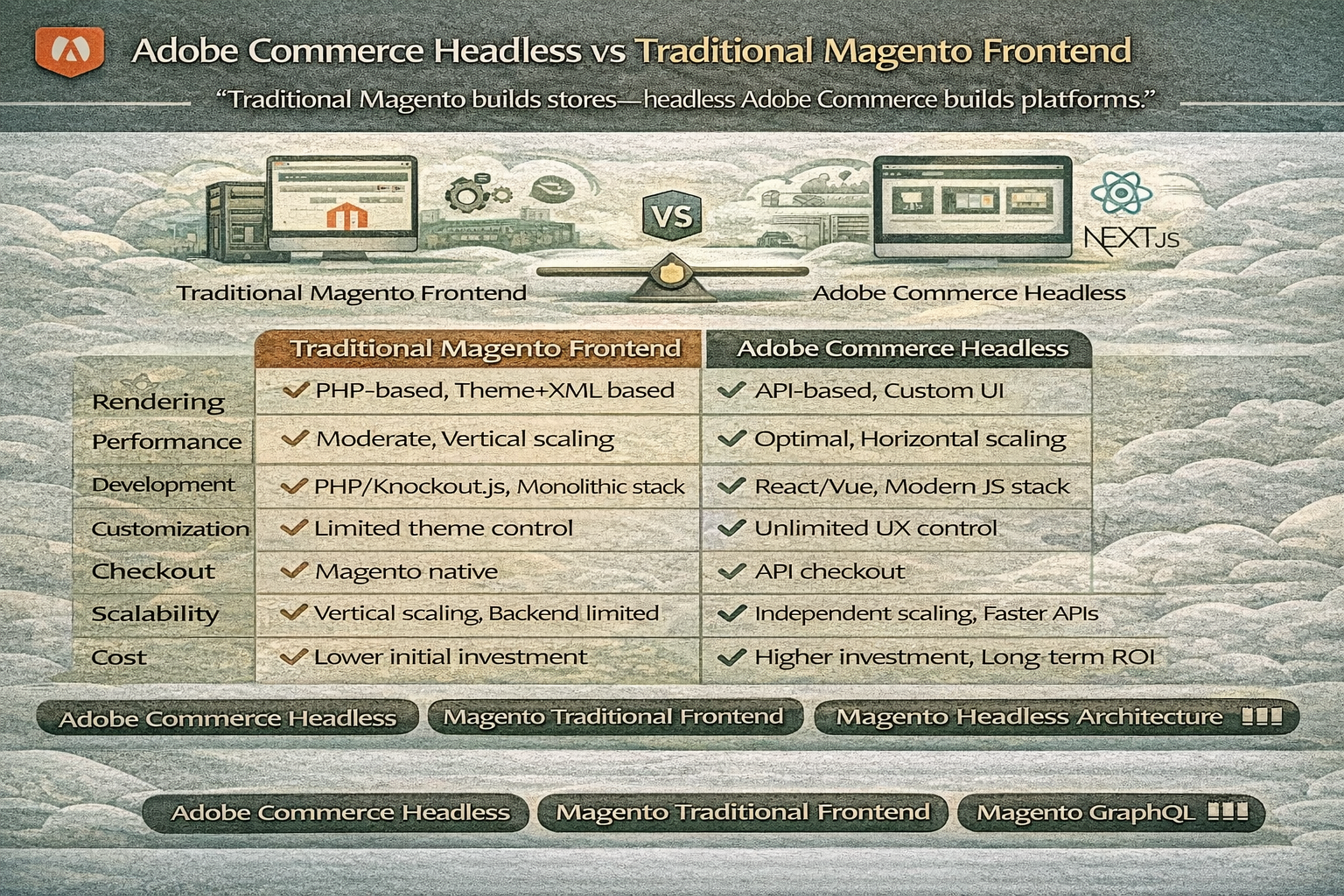
This guide compares Adobe Commerce headless vs traditional Magento frontend from a performance, scalability, and development perspective.
“Adobe Commerce doesn’t force headless — it enables it.”
Understanding the Two Approaches
Traditional Magento Frontend
- Uses Magento’s Luma or custom theme
- Frontend rendered by Magento
- Coupled architecture
- PHP + Knockout.js
- Layout XML-based rendering
Adobe Commerce Headless
- Magento used only as backend
- Frontend built using React / Next.js / Vue
- API-driven communication
- No Magento themes
- Fully decoupled architecture
Architectural Comparison
| Layer | Traditional Magento | Adobe Commerce Headless |
|---|---|---|
| Frontend | Magento theme | Custom frontend |
| Backend | Magento | Magento |
| Communication | Internal PHP rendering | GraphQL APIs |
| Deployment | Single application | Independent services |
| Scaling | Vertical | Horizontal |
“Traditional Magento renders pages — headless Magento delivers data.”
Rendering Model
Traditional Frontend
- Server-side rendering via PHP
- Layout XML + PHTML templates
- Slower Time to First Byte
- Limited frontend flexibility
Headless Frontend
- API-based rendering
- SSR / SSG / ISR via Next.js
- Faster frontend performance
- Modern UI frameworks
This difference heavily impacts speed and UX.
Performance & Core Web Vitals
Traditional Magento
Pros:
- Built-in caching
- Varnish support
Cons:
- Heavy frontend stack
- Slower LCP
- Harder optimization
Adobe Commerce Headless
Pros:
- Faster page rendering
- Improved Core Web Vitals
- Edge caching support
- Better mobile performance
“Headless improves performance by reducing what Magento renders.”
Development Experience
Traditional Magento
- PHP-heavy development
- XML layout complexity
- Longer customization cycles
- Frontend tightly coupled to backend
Headless Adobe Commerce
- Frontend and backend teams work independently
- Modern JavaScript stack
- Faster UI iteration
- Clear separation of concerns
This dramatically improves developer velocity.
API Usage & GraphQL
Adobe Commerce headless relies heavily on GraphQL.
Benefits
- Fetch only required data
- Reduced payload size
- Optimized for React rendering
- Native headless support
Traditional Magento uses GraphQL optionally — headless requires it.
“GraphQL is optional in traditional Magento — mandatory in headless Adobe Commerce.”
Customization & Flexibility
| Area | Traditional | Headless |
|---|---|---|
| UI customization | Limited | Unlimited |
| UX experimentation | Difficult | Easy |
| Omnichannel support | Limited | Native |
| A/B testing | Complex | Simple |
Headless enables full creative control over customer experiences.
SEO Capabilities
Traditional Magento SEO
- Built-in meta handling
- Default sitemap generation
- SEO-friendly URLs
Headless SEO
- Requires SSR implementation
- Manual metadata management
- Structured data handled by frontend
“Headless SEO is more powerful — but entirely your responsibility.”
Checkout & Commerce Logic
Traditional Magento
- Native checkout
- Mature workflows
- Faster implementation
Headless Magento
- Checkout via APIs
- Complex implementation
- Requires deep Magento expertise
Checkout is often the most challenging part of headless builds.
Scalability & Enterprise Readiness
Traditional Magento
- Scales vertically
- Requires strong servers
- Limited frontend scaling
Adobe Commerce Headless
- Independent frontend scaling
- Backend optimized for commerce logic
- Better global traffic handling
“Traditional Magento scales infrastructure — headless scales architecture.”
Cost Comparison
Traditional Magento
- Lower initial development cost
- Faster time to market
- Lower maintenance complexity
Headless Adobe Commerce
- Higher initial investment
- Requires frontend engineering team
- Long-term scalability benefits
When to Use Traditional Magento Frontend
Choose traditional Magento if:
- You need fast deployment
- You rely on Magento-native features
- You have limited frontend resources
- You don’t need omnichannel delivery
When to Choose Adobe Commerce Headless
Choose headless if:
- You need custom UX
- You target mobile-first users
- You require omnichannel commerce
- You operate at enterprise scale
- You want long-term flexibility
Final Verdict
| Business Need | Recommended Approach |
|---|---|
| Fast launch | Traditional Magento |
| Enterprise scalability | Adobe Commerce Headless |
| Custom UX | Headless |
| Lower cost | Traditional |
| Omnichannel strategy | Headless |
“Traditional Magento builds stores — headless Adobe Commerce builds platforms.”
Conclusion
The choice between Adobe Commerce headless vs traditional Magento frontend depends on business maturity, technical resources, and growth strategy.
Traditional Magento remains reliable and feature-rich.
Headless Adobe Commerce unlocks modern architecture, superior performance, and future scalability.
There is no universal winner — only the right choice for your scale.